

PayPal is one of the best payment services you'll find out there—it has all the financial tools you'll need to manage your finances both online and locally.
What I love best about the payment giant is the streamlined sign-up process dedicated to each country where the service is available. But we all know that out of the more than 200 available countries, having a US PayPal account comes with some perks, don't we? I believe you know what I'm talking about.
Fortunately, there's an easy way to create a verified US PayPal account from any country in the world—yes, you got me right, and to help you out, I've compiled the steps you need to take to set up your own verified PayPal account.
How to Create a Verified USA PayPal Account
If you're located outside the United States, you won't be following the normal sign-up process as US residents will. You'll need a few things before even considering taking the steps, including:
- Internet Browser (Any) - Preferably Chrome browser
- Premium VPN App with available USA IP
- US Bank Account or US Credit Card - Get it here or after the procedure
- USA Virtual Phone Number - Get it here or after the procedure
- USA Real Address - Get it in or after the procedure.
Note:
The above requirements are crucial if you want to get a real working US PayPal account without limits. Don't worry about how to get them. I will show you how you can get each of the requirements still in this article, just after the procedure, so make sure you check it out.
Once you're sure you have the aforementioned requirements, you can follow these steps to create your USA PayPal account:
Step 1: Setting up the Basics
On your mobile or PC device, connect to a VPN pointing to the United States. You will need a real working US VPN or a Tor Browser that will point your IP address to the US. The VPN will make our virtual appearance as residents of the United States. That is why we need to use a VPN. You can get premium VPN apps for free that you can use with PayPal here or just after the procedure.
Open the PayPal official site. Make sure that you are in the US directory of the site. Here, all US features will be available.
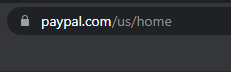
How to check and make sure you are in the US directory on PayPal? In your browser address bar, you'll see something like /us/. Then here you are in the US directory. In the case that you aren't, then change the country code (two-letter code) from yours to ours. For example, if you are located in South Africa, then you will see /za/, in Nigeria, /ng/, just change that to /us/. This happens when you don't use a good VPN, but if you use a good VPN, you will not have any issues.
Step 2: Verify USA Number
On the PayPal site, click on Sign Up at the top right-hand corner of the screen, or just click on Sign Up For Free.
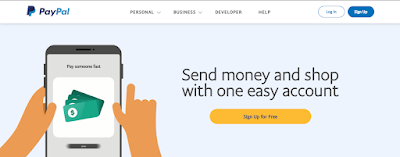

On the Next screen, you will be asked to provide a US Phone number. You can get free USA virtual phone numbers from here, or just get them after the complete procedure. You need a real working USA virtual number for this task if otherwise, PayPal will reject your number.
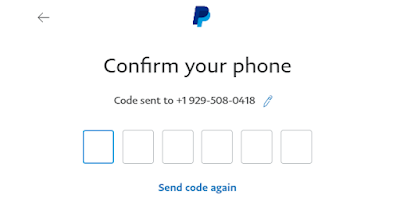
When you enter your USA number, you will be asked to verify the number by entering a code sent to the USA Number, just as below. Just enter the code sent to you and then pass this step.
Step 3: Creating an Account
Once you have entered your phone number, you will be asked to set up your profile. Here, you will have to provide your email, first name, last name, and create a password. You can use your real email address as well or you can use a temporary email address to create the account. If you are creating an account for your personal use and you plan to use the account for a long time, then consider using your real email address.

Just provide all the required information and pass this step.
You will be required to provide your address. You need to use a real address here for this to be done legit.
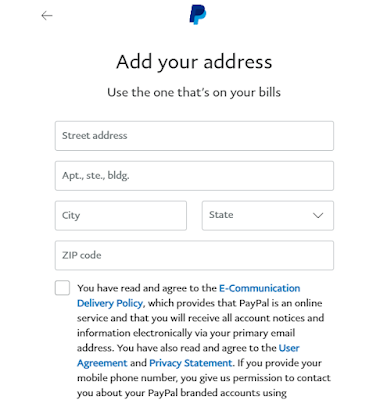
So to get a working USA address for PayPal, you first need to find your IP online and the State or City in which you are located before getting a working address for that State or City.
To get your IP address, visit this site, and you will get your USA IP address if you are using a VPN as shown above.
Once you have gotten to the city in which you are located, go to Google.com and search for an address in the city. Example: if you are located in Boston, search for addresses in Boston City. When you get the results, switch to Google Maps and get your address from there to use on PayPal.
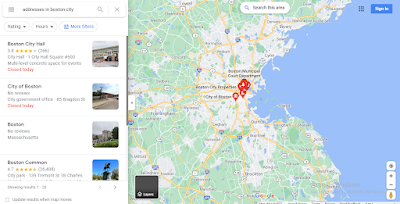
However, if the Google Maps step is complicated for you, you can use a Random USA Address generator.
Once you have entered the address, click on Agree and Create Account to create the account.
Step 4: Linking a Card or Bank to PayPal
Hurray, your account has been created. Now you will have to add your credit card or bank details. This card or bank should be from the US so that all should continue to be legit.
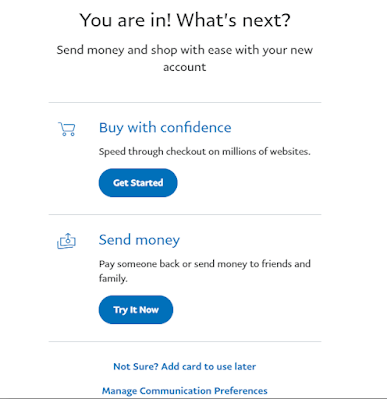
You can click on Not Sure? Add a card to use later to add your card later or just add a card immediately as shown below.
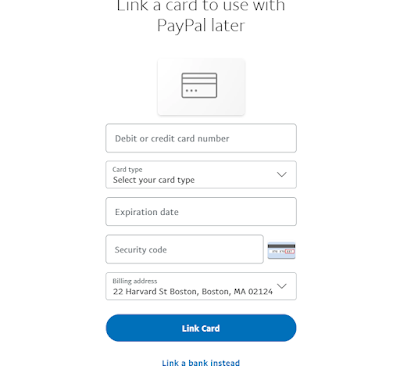
If you are not located in the US, then this should be a problem for you because you will find it difficult to get a USA credit card, but we have simplified this restriction for all of you reading this who are not in the US. We have made several tutorials on how to get virtual credit cards in the US for non-residents. So you can check them out.
However, if you are located in Africa, you can get a virtual credit card from cheap providers such as Noupia, PayQin. These virtual card providers issue US virtual credit cards at cheap rates that you can then link to your PayPal account. You can still use Eversend to get a virtual credit card. You can also get a working virtual card from these instant virtual card provider apps with little or no fee.
Once you have your virtual card, link it to your PayPal account. What you will get from any of the methods above is authentic and as such, can verify your PayPal account. PayPal will have to charge the card some amount in order to verify it. You will be sent a PayPal code that you will have to enter in your account to verify the card in order to lift its limits.
Step 5: Finishing Up
When the verification is done, your account will have no limit, and you will be able to send and receive money from anywhere in the world, and equally, you will be able to withdraw the money without stress from your PayPal account.
That is it, you now have your verified USA PayPal account that you can use without limits.
There is another PayPal account type known as PayPal Business. So, what is PayPal's business actually?
What is PayPal Business?
Your business can accept payments for goods and services through PayPal. Using a PayPal business account, you can accept online payment via PayPal, as well as in your store or business office, through a mobile card reader, and by phone. Many people, especially those shopping online, prefer to pay using PayPal.
PayPal Business is a professional account that is mainly used for receiving and sending payments. However, it sometimes has some charges that are required to be paid monthly.
What's the difference between Personal and Business PayPal Account
A Personal PayPal Account is recommended for users who shop and pay online, or want to send or receive personal payments for shared expenses, in the case of, for example, a split restaurant bill or rental charges. It is not recommended that sellers open a Personal account to receive online payments, as the transaction commissions are higher.
A Business PayPal Account is recommended for merchants who act under the guise of a business or group name. This account offers additional features, such as limited access to 200 employees on your account and a Customer Service email alias, so that any issues with your customers are handled appropriately for faster follow-up.
A Premier PayPal Account is recommended for occasional or private sellers who want to receive and make payments online.
How to Get a USA Virtual Credit Card and Bank Account
USA Virtual Bank accounts or virtual credit cards are the best means to show our virtual presence within the US. There are lots of things we can do when we have these USA virtual bank accounts or virtual credit cards, especially when it comes to getting a USA PayPal account. We have written lots of guides on how to get a US virtual credit card that you can use on PayPal for verification and for most other purposes. Equally, we have guides on how to get a US virtual bank account. You can get the links to these guides below.
How to Get a USA Virtual Phone Number for PayPal Verification
To have a real and working USA PayPal account, you will need a working USA phone number that you can use to verify the PayPal account with. We have provided complete guides on how to get a USA virtual phone number for PayPal verification.
How to Get a USA Real Address for PayPal
The best way to get a USA Real address is by reaching out to someone who is located within the US, and then, the person can help you with his or her address. However, this is what you should do if you don't have a person that way.
1. Using Google Maps
Google Maps is the best way to get a working residential address, not only in the United States but from any country equally. You can use Google Maps to get a USA address to use with your PayPal account, as shown in the procedure of this article.
2. Using a USA Random Address Generator
This is the option most people go for. Random USA address generators give good USA addresses equally and are known to be the easiest way to get a USA address for many, because you just have to click on generate, and you will be served with lots of addresses.
You can use this random address generator, which works pretty well in generating random USA addresses for PayPal.
Frequently Asked Questions
How do I verify my PayPal account instantly?
To verify your PayPal account, you'll need to submit your card or bank information. PayPal will verify these details with your bank. The confirmation process only takes a few minutes.
How do I know if my PayPal account is verified?
You'll know if your PayPal account is verified when your spending limits will be lifted and that you'll be able to access some PayPal features to which you were restricted.
What is the difference between verified and unverified PayPal account?
The main difference between a verified and unverified PayPal account is based on money transfer. A verified PayPal account is allowed to send and receive money, while an unverified PayPal account is restricted from transferring money to a bank account.
Can I withdraw money from PayPal without being verified?
No, you can't withdraw money from PayPal without being verified. However, you can spend the money online.
Final Thoughts
We all know of the numerous advantages a USA PayPal account can give us. The only thing is you will need to get some essential and vital stuff to get this PayPal account up and ready. We have shown you in this guide the best way you can get a US PayPal account that you can use for your own personal use for sending and receiving money equally for withdrawing funds from the account, which is one of the limitations of some PayPal accounts. You can also use the premium VPN to create a US PayPal account, but if you don't attach a credit card or bank account to this PayPal account, it will be limited t,o and you will not be able to perform transactions with the account. When all verifications are complete, your account limitation will be removed, and you will have access to the complete services of PayPal US.
