

Google Opinion Rewards is one of the best apps when it comes to making money online without hassle and with no investment. You will earn free Google Play Credits as rewards for taking surveys and completing offers. Knowing how to get unlimited surveys on Google Opinion Rewards can be important to increase your Google Play credits.
Google Play Credits are used for in-app purchases of apps and services on the Play Store. One great way to recharge your Google Play balance is by using Gift cards. Google Play Gift cards are not only used to recharge your balance but you can also sell them for cash instantly.
A great way to get Google Play Gift cards is by completing surveys in the Google Opinion Rewards App. Once you've accumulated enough balance, you can withdraw funds to your Google Play balance. If you want cash instantly, you can consider to withdraw your Google Play balance to bank account or PayPal.
To get unlimited surveys on Google Opinion Rewards, you need to answer surveys regularly and enable notifications for every new eligible survey. In this way, Google Opinion Rewards will regularly send you new rewards and surveys to complete. Shopping is the key to getting unlimited surveys on the app. Keep in mind that you cannot hack the Google Opinion Rewards app for unlimited surveys. You need to comply fully with the app in order to regularly receive offers.
That said, if you want to know more ways to get unlimited surveys on Google Opinion Rewards, continue reading. In this article, I will show you some tips you can imply to get as many surveys as possible on Google Opinion Rewards.
CHECK ALSO: 16 Legit Ways to Get Free Gift Cards
What is Google Opinion Rewards?
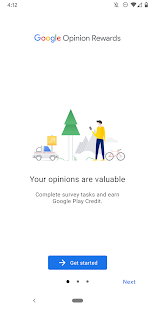
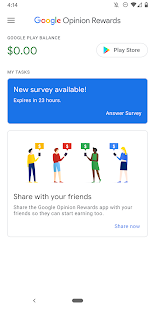
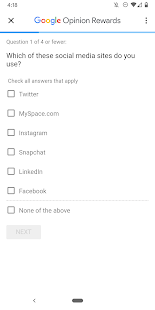
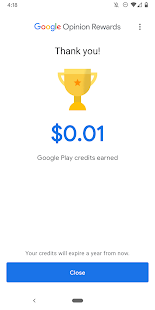
Google Opinion Rewards is a rewards-based program developed by Google. It was first released as a Google-developed survey mobile app for Android and iOS. Users can use the app to complete surveys and get rewards.
Android users can earn Google Play credits, which can only be redeemed if they purchase paid Google apps, whereas iOS users are rewarded via PayPal. However, only users of 18 years and above are eligible to use the app.
The best part is that the surveys are only a few minutes long, allowing you to take advantage of everything offered in the Google Play store. Even without spending a penny, you may watch TV shows, movies, play games, and read books.
How Does Google Opinion Rewards Works?
Once you open the Google Opinion Rewards app, you'll need to login using your Google account. A preliminary survey should be sent to you to examine your willingness to participate in a mutually beneficial relationship and to determine your demographic.
Your purchasing experience is used to create Google Opinion Rewards surveys. If you've been shopping, you should be able to respond. Completing surveys takes around 10 seconds, and you usually get a few cents added to your account.
Over the course of several weeks, you can save up enough credit to purchase Play Store credits. When you're ready, click Buy to make sure your Google Play balance is set as the payment method.
CHECK ALSO: How to Get Free Gift Cards Online Without Completing Offers
7 Ways to Get Unlimited Surveys on Google Opinion Rewards
You cannot directly get unlimited surveys on Google Opinion Rewards but you can follow some guidelines to ensure you have as many surveys as possible on the app.
That said, here are some tips to get unlimited surveys on Google Opinion Rewards:
- Keep your Google Opinion Rewards app updated.
- Make sure you check the app on a regular basis and that the Google Opinion Rewards notifications are turned on.
- When you go out of a store, fill out surveys honestly and quickly to ensure more deliveries of surveys.
- It doesn't matter what gender you are, but if you go shopping frequently, you can earn more rewards with Google Reward Opinions. Women have higher chances of enjoying this tip because they regularly do shopping.
- You should shop at well-known stores on a regular basis to generate more Google surveys.
- Stay away from fake surveys because it wouldn't help you in any way.
- Watch videos sent by Google — These videos are sent by Google to evaluate the interest rating of a specific video sent. Watching and engaging with such videos can increase your chances of getting more surveys.
CHECK ALSO: How to Get Free Amazon Gift Cards and Codes
Enable Location Services to Get More Surveys on Google Opinion Rewards
While you may be served with surveys about online purchases, many Google Opinion Rewards surveys are about your recent travels. If you allow location services in Android, you'll have a better chance of receiving surveys asking where you traveled.
In most circumstances, the data is obtained to aid in the improvement of Google Maps. Open Settings > Lock screen & security, scroll to Privacy, and select Location to ensure the correct Location setting is selected.
Make sure Use location is turned on, then go to Advanced and make sure Google Location Accuracy is turned on as well.
This method establishes your location via GPS, Wi-Fi, Bluetooth, and mobile networks, and it's the best option if you want to earn money with Google Opinion Rewards. It's also worth noting that it's a privacy minefield.
CHECK ALSO: How to Get Free Trials Without Credit Card or PayPal
How to Get More Surveys On Google Opinion Rewards
- Check the app on a daily basis to make sure Google Opinion Rewards notifications are turned on.
- You'll get more Google rewards surveys if you respond quickly to surveys.
- Be a woman: it appears that women who spend a lot of money and shop frequently have more opportunity to earn prizes through Google Reward Opinions.
- Regular shopping trips to well-known stores: staying at home is not a good strategy to get Google surveys.
- Tell the truth: the application occasionally sends out a "fake" survey to filter out undesirable responses. Trick questions may ask if you visited a place you didn't go to or participated in an activity you didn't do. Fake questions are easy to recognize, but lying about your answers will cost you money in the long term.
What's the Best Location for Google Opinion Rewards?
This is a difficult question to answer because it is heavily influenced by other parts of your activity.
However, you're going to score more Google rewards surveys living in a city and being active than living in the countryside. There is more to do in and around a city, with more sites for your phone to check in with. As a result, having an active work, social, and shopping life in an urban location is one of the best ways to earn more Google Opinion Rewards surveys.
As you may know, the more surveys you complete, the more money you can earn.
CHECK ALSO: How to Netflix Premium for Free
4 Ways to Spend Your Google Opinion Rewards
You may use the money you've saved in the Google Opinion Rewards app to good use.
That said, here are 5 ways to spend your Google Opinion Rewards:
- Subscribe to your favorite apps.
- Purchase Google Play songs, albums and movies.
- Upgrade most of your apps from free version to premium versions to use them without ads.
- Transfer the balance to PayPal or Cash App for better uses.
CHECK ALSO: Best Virtual Prepaid Cards for International Shoppers
Google Opinion Rewards Hack App
It is not a great idea to use a Google Opinion Rewards hack app not only because you might loss your credentials due to Phishing attack by the app, you might also get your account banned by Google. It is good you stay away from any modified version of the Google Opinion Rewards app and follow these pro these outlined above to get more surveys in the Google Opinion Rewards app.
CHECK ALSO: 6 Ways to Get a Free US Number for SMS/Google/WhatsApp/Facebook/Telegram/
Final Thoughts on How to Get Unlimited Surveys On Google Opinion Rewards
Google Opinion Rewards has been one of the best choices of many to earn money online without having to do hard tasks. Getting unlimited surveys on the Google Opinion Rewards isn't directly possible because you cannot hack the official app. You can use some effective tips to trigger more surveys deliveries to your account an earn more Google Play credits and redeem codes.
Which tip worked out for you? Have anything to add? Let us know in the comments section or in our Telegram Forum.
![How To Get Unlimited Surveys On Google Opinion Rewards [7 Pro Tips]](https://blogger.googleusercontent.com/img/b/R29vZ2xl/AVvXsEhIZOWwxvKE5I9x1ZmCgnKvGeLJeA0KcqBe1qVJdww3dXRwIHowdNu5K0xcMuFJNSgkEsNR0R57c7oxKCkkRG_G_xcF7-5qz1-W1RdHQ7oihv1TMvNWvKax3-ux9Mp4mNSpkWPMthKmYN7nf6koGDofy9vWZvqpsKGBl1YjJCwDwwhZZFDAf8MIFJN7/w200-h200-p-k-no-nu/Unlimited%20Surveys%20On%20Google%20Opinion%20Rewards.webp)